Designing for Performance: Web Vitals Deep Dive
Learn how to optimize Core Web Vitals — LCP, INP, and CLS — with actionable techniques and real metrics.
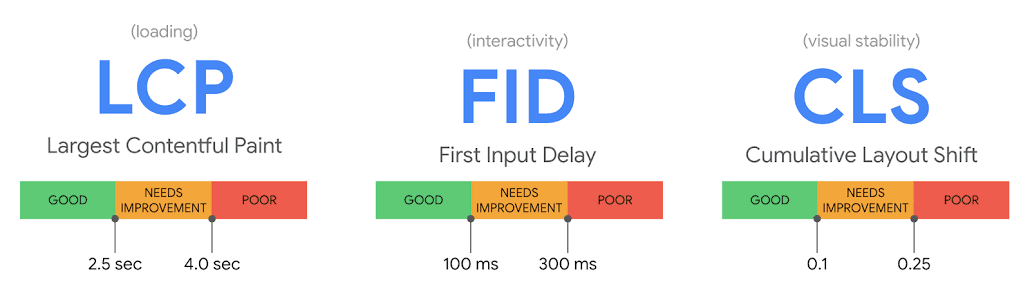
Core Web Vitals
Google's Core Web Vitals are a set of real-world metrics that measure user experience on the web. They've become critical for both SEO and user satisfaction.
The Three Pillars
- LCP (Largest Contentful Paint) — loading performance
- INP (Interaction to Next Paint) — interactivity
- CLS (Cumulative Layout Shift) — visual stability
Optimizing LCP
LCP measures when the largest visible element (usually an image or text block) is rendered. Aim for under 2.5 seconds.
Image Optimization
import Image from 'next/image'

// ❌ Bad — no size hints
<img src="/hero.jpg" alt="Hero" />

// ✅ Good — explicit dimensions, lazy loading
<Image
  src="/hero.jpg"
  alt="Hero"
  width={1200}
  height={630}
  priority
  className="border-2 border-border rounded"
/>
Critical CSS
Inline critical CSS in the <head> to render above-the-fold content immediately:
<style>
  /* Critical styles only */
  html { font-family: sans-serif }
  .hero { display: flex; min-height: 80vh }
</style>
Reducing CLS
CLS measures unexpected layout shifts. Keep it under 0.1.
Always Set Dimensions
/* ❌ Bad — causes layout shift */
img { width: 100% }

/* ✅ Good — preserves space */
img {
  width: 100%;
  height: auto;
  aspect-ratio: 16 / 9;
}
Reserve Space for Dynamic Content
// Reserve space for embeds
<div style={{ aspectRatio: '16/9', maxWidth: '560px' }}>
  <YouTubeEmbed videoId="dQw4w9WgXcQ" />
</div>
Improving INP
INP measures the time from user interaction to the browser painting the next frame. Aim for under 200ms.
Code Splitting
// Dynamic import for heavy components
const HeavyChart = dynamic(() => import('@/components/Chart'), {
  loading: () => <ChartSkeleton />,
  ssr: false,
})
Avoid Long Tasks
Break up long JavaScript tasks into smaller chunks using
setTimeout,requestIdleCallback, orscheduler.yield().
function processItems(items: Item[]) {
  let i = 0
  function chunk() {
    const end = Math.min(i + 50, items.length)
    while (i < end) {
      process(items[i])
      i++
    }
    if (i < items.length) {
      setTimeout(chunk, 0)
    }
  }
  chunk()
}
Measuring Performance
| Tool | Purpose | Type |
|---|---|---|
| Lighthouse | Lab-based audit | Automated |
| Web Vitals Library | Real user monitoring | JavaScript |
| Chrome DevTools | Detailed profiling | Manual |
Conclusion
Performance optimization is an ongoing process. Measure first, optimize the bottlenecks, and repeat. Small improvements compound into a significantly better user experience.